Generating another variation is often easier than deciding which variation deserves more work. A ComfyUI graph can produce different images, edits, thumbnails or video treatments, while the decision about the audience happens outside the graph. You export files, write a research brief, collect a result and then find the matching original again.
Minds brings a focused preference question into that workflow. One Minds · Audience Preferences node accepts the alternatives, prepares a reviewable Study draft, runs it after approval and displays the response in the graph. Original selected images or videos can continue directly to saving or further processing.
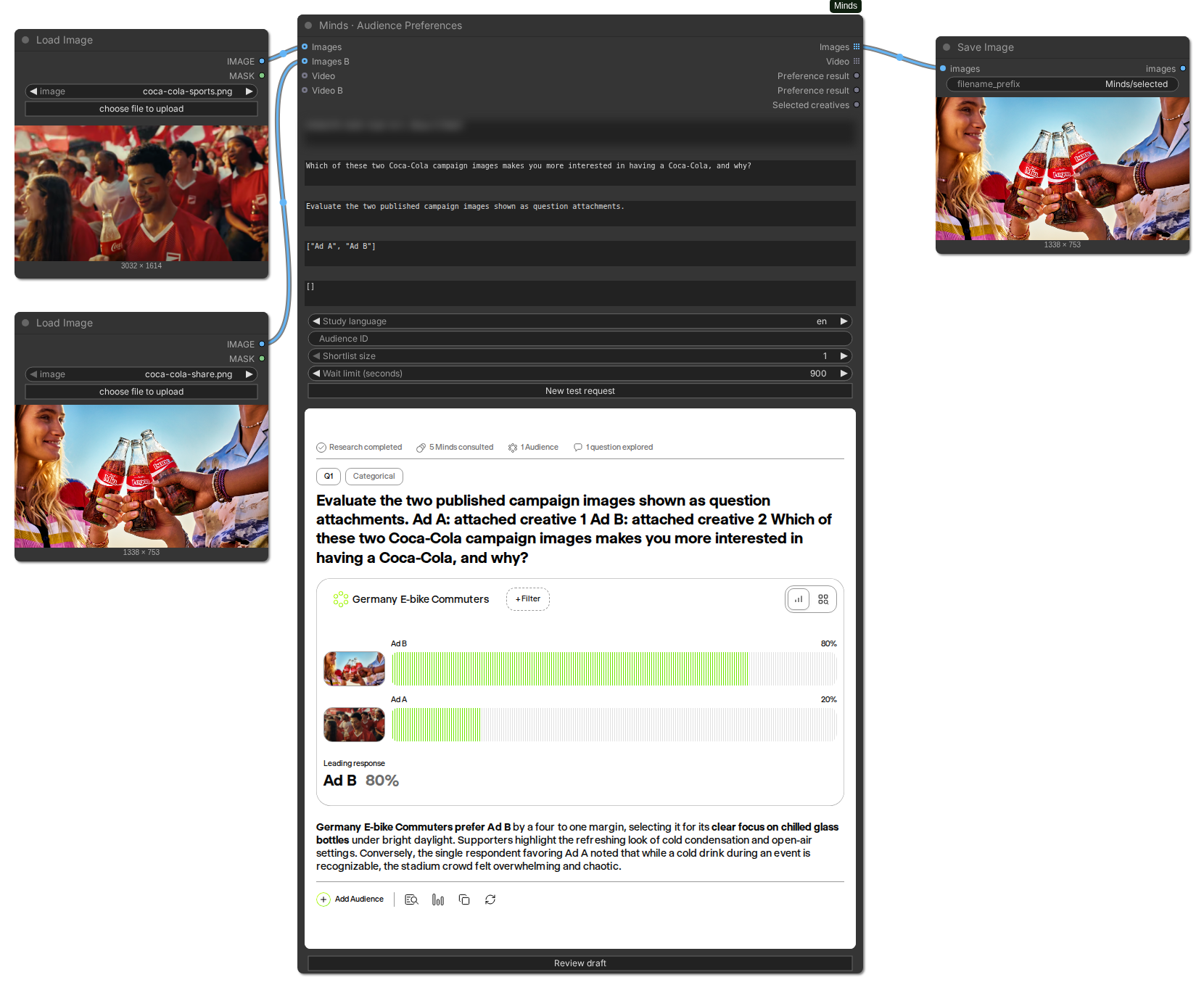
The creative decision in this example is between football-event energy and a bottle-focused Share a Coke scene. Four QA Minds chose the second image, Ad B; one chose Ad A. The 80%/20% split belongs to this five-Mind integration check. The workflow capture retains the campaign inputs and the saved original so the preference can be traced back to what was shown, without treating it as an ad-performance forecast. Campaign sources: Coca-Cola football, Share a Coke.
Place the pointer over the results and scroll with the mouse wheel or a two-finger trackpad gesture to reach the findings and bottom controls. The graph stays in place. This taller documentation capture shows the entire result at once.
Minds is the end-to-end platform for commercial synthetic research. It connects qualitative and quantitative work through reusable Minds, Audiences and Studies. PRISM is the reasoning, inference and source-modeling foundation beneath each Mind, using public-source context and permitted research inputs where enabled for scoped directional research.
The broader platform supports open-ended investigation, questionnaires and quantitative methods including MaxDiff. This ComfyUI integration provides a focused categorical preference test within that connected system. It is useful when the immediate decision is which of the supplied alternatives a selected population prefers for a stated purpose. The feature guide explains the wider research methods when the question needs more than a graph-level choice.
The result widget is embedded in the node while normal ComfyUI fields collect the question and inputs. You can work with the response visually and use structured outputs for routing. The node does not require a separate planning node, approval node and ranking node for the everyday path.
Define the decision before generating a large batch. “Which image is best?” leaves the purpose unclear. “Which image would you prefer as the opening visual on this product page?” supplies a use and a preference criterion. Neither version establishes measured conversion uplift, but the second gives you a clearer decision to investigate.
Keep the alternatives comparable enough that you can use the answer. If every candidate changes the product, claim, visual style and placement simultaneously, preference can tell you which complete package was selected without isolating why. That can still be useful, but it is a different task from testing one revised headline or opening shot.
Choose an appropriate Audience, inspect its grounding and readiness, and preserve the viewing context across the comparison. The Mind guide describes the respondent foundation. A population with a relevant name does not automatically establish representativeness or make a creative percentage safe to use as a market forecast.
Connect two generated image executions to images and images_b, then label them in labels_json. Describe the product and placement without telling the Audience which image you want to win. Ask which execution they prefer for that stated use.
The useful outcome is a next creative action: keep one execution for further development, investigate a recurring concern in the findings, or preserve a close pair for another comparison. Read the answers alongside the distribution. A preferred aesthetic and a credible product explanation are related creative questions, but they are not interchangeable measurements.
For a cleaner revision test, keep the underlying offer and context stable and change the intended creative element. If you change several elements, describe the result as preference for an execution rather than claiming you isolated the impact of one element. The pack's ad-selection example provides the graph shape; the setup guide explains how to connect your actual media and Audiences.
A thumbnail is seen alongside a title, at a particular size and in a particular feed or interface. Include the relevant context in the question and present the candidates at a useful rendering size. If your decision depends on legibility, the stimulus should retain the text and composition the Audience is meant to judge.
Ask a scoped question such as which thumbnail they would prefer for the described video. Do not rename the resulting preference share “click-through rate.” The node records a synthetic categorical response; it has not shown the thumbnails to a recruited population in a live feed and measured their clicks.
You can use a preferred direction to prepare the next iteration. If the answers highlight ambiguity or a misleading expectation, revise the candidates and start a new test. Keep the previous Study reference so the team can distinguish the first comparison from the revised material.
Use image alternatives to test a packaging direction as shown. State the product category and the situation in which the design should be considered. Keep labels neutral and ensure the visible copy is the copy you intend to test.
An image can support a question about the presented visual execution. It cannot establish the physical feel of a material, the experience of opening a package or the performance of a real object. If those aspects matter, add the appropriate evidence to your wider research process rather than treating an image preference as a sensory test.
For a packaging iteration, preserve the original creative and the changed version. The graph can return the preferred original image while the saved Study retains the research context. This makes it easier to explain the decision than a screenshot of an unlabelled winning bar alone.
The native VIDEO inputs accept actual clips. The adapter encodes them as MP4 for upload and keeps the original VIDEO objects for downstream selection. Audio present in those objects is retained. This makes the workflow suitable for a question that depends on the complete execution rather than on a written description of an imagined edit.
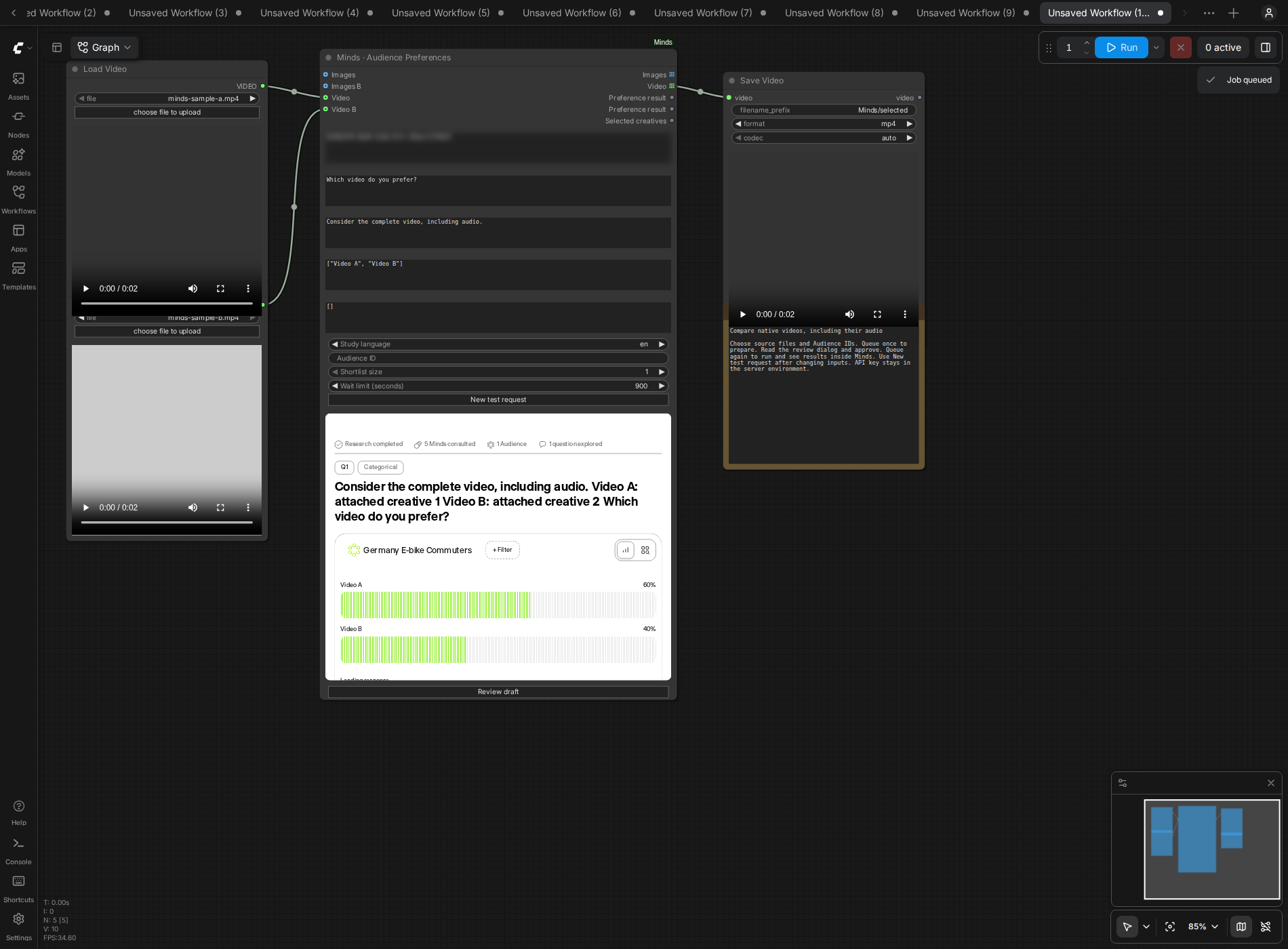
This capture shows two short, two-second fixtures with audio. Three QA Minds selected Video A and two selected Video B, producing 60%/40%. The test included approved execution, result rendering and native video saving. It establishes that this short-video path worked in the tested ComfyUI environment, rather than proving compatibility with every long-video format or duration.
Specify whether the Audience should consider the clip with sound and which use the preference concerns. A product-introduction question differs from a question about an opening hook. If your final decision requires observed watch time or attention, gather that evidence separately. The video guide covers the ports, limits, candidate order and audio considerations in detail.
Connect the original creative and the proposed revision. Name them clearly, describe the same intended use for both, and ask a focused preference question. Keep a record of what changed so a colleague can understand the comparison later.
If you revised several elements, the response concerns the whole revision. A better result cannot by itself identify which edit caused the change. If the next decision needs that distinction, design another comparison or use the broader Minds workflow to investigate the specific issue.
Press New test after changing the material, question, labels, context, Audiences or study language. That creates a new request identity and requires a new review. Reusing an old approval for a different revision would undermine the connection between the creative and the saved research.
Choose several ready Audiences when the same creative may serve different populations. The response keeps each Audience's distribution separate. A disagreement can be useful: one execution may fit one group's needs better while another group prefers a different direction.
Do not pool those results into a global winner without a defensible research design. The node intentionally requires selection_audience_id when several Audiences are present and native selection should proceed. Choose an included Audience whose ranking should control that graph branch. Other Audience results remain available for inspection.
If the segments suggest different creative treatments, develop those directions as explicit decisions. The node does not silently infer a market-size weighting from Audience names, and a larger number of Minds in one test is not automatically a population-weighting rule.
Install the official ComfyUI-Minds pack into the ComfyUI server you control, install its requirements with that server's Python and restart it. Configure your credential manager to inject MINDS_API_KEY into the server process. The key belongs outside the shared workflow JSON and ordinary input widgets.
Load one of the pack's examples or add Minds · Audience Preferences. Connect the media, supply distinct labels, enter existing ready Audience IDs, and write the question and context. The node also supports hosted image/video references and labelled text concepts through assets_json; those inputs produce selected references or concepts rather than native media that was never connected.
Queue once to prepare the saved draft. Inspect its question, alternatives, selected Audiences and language. Approve it, then queue again to execute the approved research. The node keeps downstream outputs blocked until the required review and completed result are available.
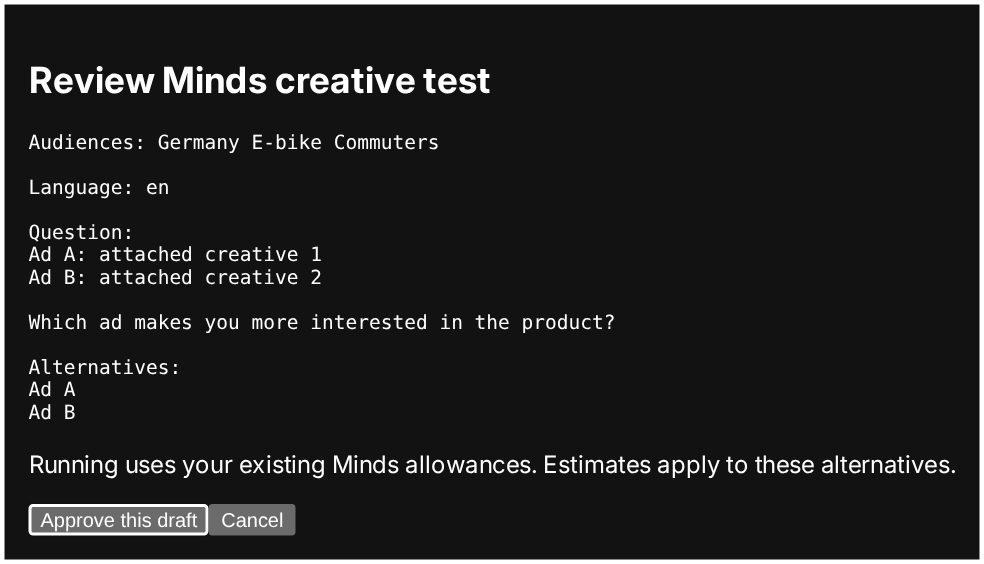
The review is a useful checkpoint for catching a reversed label order, an unrelated Audience or a viewing condition that the question forgot. It also ensures the saved research matches the requested question rather than silently accepting a revised plan.
Read the embedded question and Audience before the chart. Examine the findings and available individual answers. Decide what the result supports: choosing a direction to refine, retaining a shortlist, investigating a confusing element, or preparing a later validation test.
Connect selected_images or selected_videos to a compatible saving or processing node to continue with the original native material. Set top_k for a shortlist. Ties at the cutoff remain included, so more than that number of candidates can be returned. The adapter preserves uncertainty in the ordering by keeping a tie rather than arbitrarily choosing the first input.
Use results_json when another step needs the Study and run references, per-Audience ranking and exact creative association. The structured result leaves confidence as null; it does not invent a statistical interval or rename preference as campaign performance. The results and troubleshooting reference documents the fields and blocked-output cases.
If the research is still running when local polling times out, queue the unchanged workflow to resume its saved run. Use New test for actual research changes. That distinction avoids treating a network interruption as a reason to create duplicate research or treating a new creative as an unchanged retry.
ComfyUI is useful when generated media should remain native in a production graph. A conversational workflow may be more convenient when the surrounding task is research planning, broader exploration or an agent-led sequence. The ChatGPT guide, Claude guide, integration overview and MCP overview describe those options.
All of these entry points connect to the broader Minds research platform. A focused creative-preference run can be one step in a lifecycle that includes Audience creation, qualitative exploration, questionnaires, supported quantitative methods, comparison and export. Keep the evidence suitable for the decision, including recruited-human observation, live measurement or physical testing where those are required.
Begin with the ComfyUI setup guide to run the first reviewed comparison. Use the video guide for motion and sound, and the results reference to inspect what the node returned. The goal is a traceable creative decision: the right population, the actual material, a clear question and a result that informs what you do next.








